AI Tools
Featured Tools
Microsoft Copilot Chat
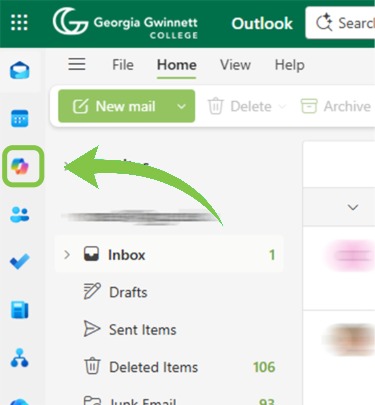
Copilot Chat is Microsoft’s AI-powered chat platform for searching for information, creating content, and communicating with others. It can be accessed in many ways, but the simplest may be through the app launcher in the upper left corner of Claw Mail in your internet browser.
Microsoft Copilot is protected by enterprise-grade data security features, ensuring that prompts and responses are encrypted, access-controlled, and never used to train AI models. When signed in with your GGC credentials, Copilot respects institutional privacy policies and safeguards your data under Microsoft’s Data Protection Addendum and compliance standards.
Copilot Chat suggests various example prompts for you when you access the home page, but here are some other examples of what you can do with Copilot Chat at Georgia Gwinnett College:
Tool Inventory
Multimedia & Design
Adobe Creative Cloud
Adobe Creative Cloud includes software and online services that use AI to generate images from text prompts, remove backgrounds from images and videos, insert and remove objects in images with Generative Fill, and generate video captions.
Adobe Express
Adobe Express uses AI to generate images from text prompts, apply templates to text, and create QR codes. Adobe Express is also integrated into the Adobe ecosystem and includes AI features from other Adobe software to remove backgrounds from images and videos, insert and remove objects in images with Generative Fill, and generate video captions.
Productivity Tools
ClickUp Brain
ClickUp Brain is your intelligent workspace assistant, designed to help you work smarter and faster inside ClickUp. Brain can answer questions about your projects, tasks, and documents, automate repetitive actions, and provide instant summaries or insights from your workspace. Whether you need to create tasks, draft documents, find information, or manage your schedule, Brain assists in streamline your workflow and saves you time. Brain’s recommendations and actions are always tailored to your organization’s context, making it a reliable partner for productivity and collaboration. Brain also leverages advanced AI features like instant summarization of tasks, docs, or discussions, and generate or edit images
Microsoft 365 Transcription / Read Aloud
Many Microsoft applications offer features that convert speech to text or text to speech. These features are often used to enhance accessibility.
Microsoft Copilot Chat
Copilot Chat is Microsoft’s AI chatbot interface included with all GGC Microsoft accounts. Accessible via web or desktop app, Copilot Chat responds to general-purpose prompts with information provided through files you choose to upload as well as web information. It also allows users to create “AI agents”, which are specialized AI tools built to handle specific processes or solve business challenge.
Microsoft Powerpoint Automatic Captions
Microsoft PowerPoint can transcribe your words as you present and display them on-screen as captions in the same language you are speaking, or as subtitles translated to another language. This can help accommodate individuals in the audience who may be hearing impaired or more familiar with another language.
Microsoft Powerpoint Designer
The Microsoft PowerPoint Designer offers suggestions for improving the layout and overall look of your slides based on the content of your presentations.
Microsoft Powerpoint Speaker Coach
The Microsoft PowerPoint Speaker Coach allows you to practice delivering your presentations. It evaluates your pacing, pitch, use of filler words, informal speech, euphemisms, and culturally sensitive terms, and it detects when you’re being overly wordy or are simply reading the text on a slide.
Microsoft Word Editor
The Microsoft Word Editor can help you to improve your documents by providing suggestions for correcting your spelling and grammar. Editor can also provide recommendations for refining your documents. Recommendations can include suggestions on clarity, conciseness, formality, inclusiveness, perspectives, punctuation conventions, and vocabulary.
Turnitin Draft Coach
Turnitin Draft Coach provides students with instant feedback on text similarity, citation, and grammar as they write. Draft Coach may be used to address unintentional plagiarism. Turnitin Draft Coach is only available with Microsoft 365 Word on the Web via Claw Mail.
Teaching & Learning
BoodleBox
BoodleBox is a supported generative AI tool providing access to multiple models including ChatGPT, Claude, Perplexity and more. BoodleBox does not use user provided data to train models.
Panorama
Panorama provides instructors with recommendations, examples, and training for improving the accessibility of content such as Word documents, PowerPoint presentations, and PDF files. For both instructors and students, Panorama offers alternate ways/formats to consume content. Panorama automatically generates these alternative formats for many MyCourses’ course files and makes them available for download.
Kaufman Library Databases
Kaufman Library provides students, faculty, and staff with access to databases on a variety of subjects. Some databases have AI assistance features, like natural language search or AI-generated article summaries. For a comprehensive list of Kaufman databases with AI assistance tools, visit the A-Z Databases page.
If you have questions about using library resources in conjunction with third-party AI tools (e.g. ChatGPT, Gemini, etc.) please contact the library for assistance, as your specific use case may not be permitted by a provider’s license.
Perusall
Perusall is a social reading and engagement tool allowing students to annotate and discuss readings. Annotations and discussions are automatically assigned participation grades.
ProctorU
ProctorU is a proctoring solution that can alert proctors and instructors to irregularities or suspicous behaviors during testing sessions.
Respondus Monitor
Respondus Monitor is a proctoring solution that flags irregularities or suspicous behaviors during testing sessions and allows instructors to review flags at their convenience.
Turnitin AI Checker
Turnitin’s AI Checker is considered an AI detection tool. It may be used to assist instructors with identifying potential AI usage in student assignments.
Caution:
AI detection tools such as Turnitin’s AI Checker can result in false positives. Instructors should use the AI Checker as one of many tools and methods in their evaluation of student assignments.
Turnitin Gradescope
Gradescope assesses paper-based and digital assessments. Gradescope identifies similar student responses enabling instructors to quickly grade, establish scoring rubrics, and assign consistent grades and feedback. Gradescope is recommended for use in courses that assess coding and problem solving skills.
Turnitin Similarity
Turnitin Similarity is a plagiarism detection feature embedded in the MyCourses Assignments tool that scans for similarity within a student’s written submission. Similarity can be used to protect against plagiarism and teach the value of original writing.
Kaltura Auto Captions
Videos hosted in Kaltura automatically have machine-generated captions.
AI Inquires?
Use this form to submit questions or suggestions related to artificial intelligence at GGC. Your inquiry will be directed to the most appropriate contact.
Page Content Maintained by AI Steering Committee