
New updates are coming to MyCourses later this week! See below for details, and please contact helpdesk@ggc.edu if you encounter any problems or have questions.
MyCourses
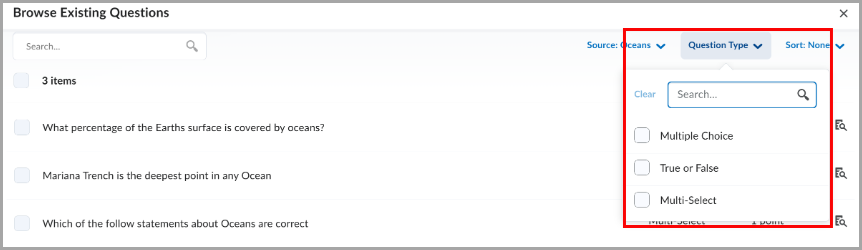
Quizzes – Improved filter and source dropdowns in Question Library | Updated
This update improves the source and filter dropdowns in the Browse Existing Questions dialog to better align with MyCourses standards and provide a more consistent experience.
Both dropdowns now include a search option, helping instructors find sources and filters more quickly.

Quizzes – Flag questions and strikethrough answer options | New
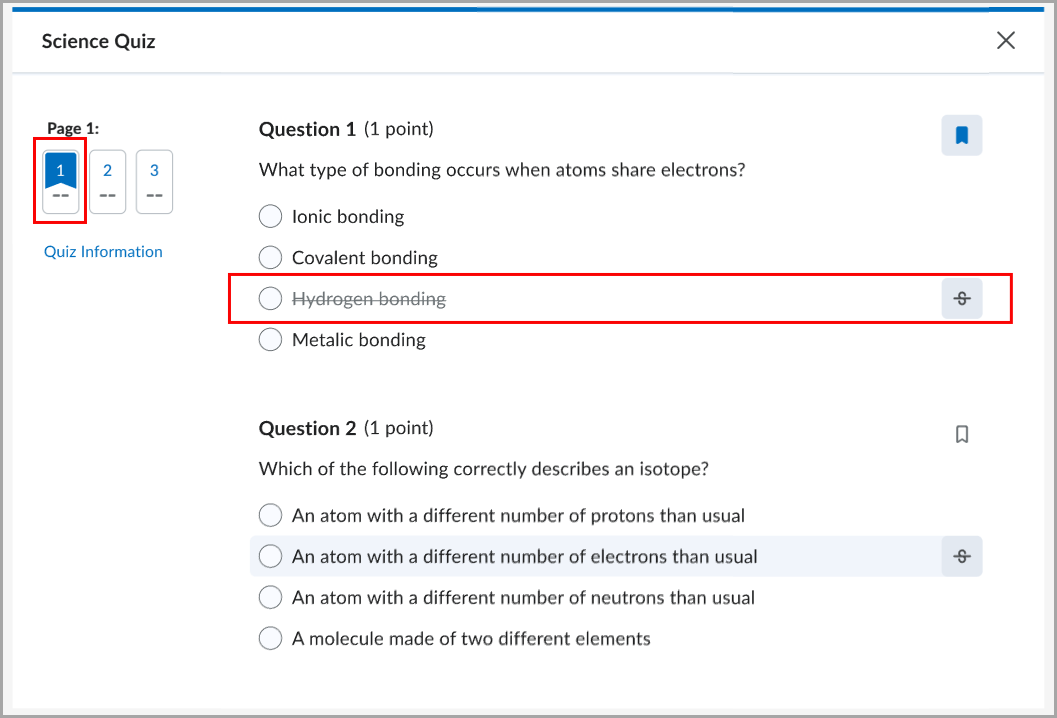
This release introduces the question annotation option in Quizzes. Students can flag quiz questions to revisit later and apply strikethrough formatting to answer options to help narrow their choices.
Students can select the bookmark icon  beside a quiz question to flag it for review. Flagged questions appear in the left navigation, allowing students to quickly return to them.
Students can also select the strikethrough icon  beside answer options to eliminate choices they believe are incorrect.
Instructors can disable these tools for students by selecting Hide question annotation tools in the Timing & Display section of the quiz edit page.

Work To Do widget – Evaluation activities are hidden by default | Updated
The Work To Do widget now helps students with multiple roles, such as teaching assistants, focus on upcoming and overdue work by hiding evaluation activities by default. Previously, the widget displayed both personal course due dates and evaluation tasks for users with multiple roles, making it more difficult to track student deadlines.

Work To Do widget – Automatically marks modules as complete | Updated
This release updates the Work To Do widget so that when students complete all activities in a module, the module is automatically marked as complete and removed from the widget.
Students now see only activities that still require completion, reducing clutter in the widget.
Previously, completed modules that have due dates could continue to appear as overdue because the module itself was not automatically marked as complete. As a result, students could see overdue modules that no longer required action and could not be manually dismissed.
Note: This change applies only to modules completed after this release. Existing modules that are already overdue continue to appear as overdue.
Need to learn more?
Need to learn more about MyCourses, Zoom, Microsoft software, Accessibility, or Classroom Technology?
Check the IT Workshop Schedule – OR- Schedule a 1-1 Consultation